|
 |
|
|
|
|
| |
| |
| |
| |
| |
| |
| |
| |
| |
| |
| |
| |
| |
| |
| |
| |
| |
| |
| |
| |
| |
| |
| |
| |
| |
| |
| |
| |
| |
| |
| |
| |
| |
| |
| |
|
|
|
» |
 |
|
| |
| |
| |
| |
| |
| |
| |
| |
| |
| |
|
 TESTIMONIALS TESTIMONIALS
|
|
"... I have been using VIP Organizer for 2 years and find it to be the best software available for managing my task list. It is highly effective, user friendly and priced competitively...."
Ellis L. Marples, -
Stockholm, NJ
|
|
|
|
|
Authorization
|
|
|
|
|
|
|
VIP Organizer: Password Protection your Information |
|
|
|
|
|
You've got a possibility to protect your database from unauthorized access by setting a password.
To do this you need to enter the dialogue [Tools | Options]
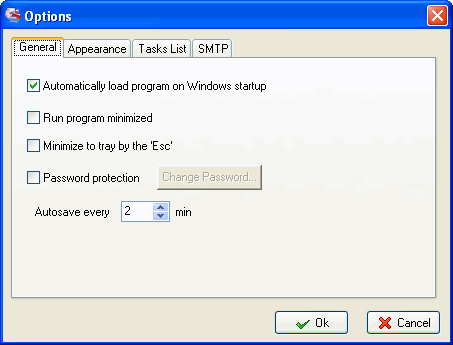
Then you should check "Password Protection" and click the "Change Password" button.

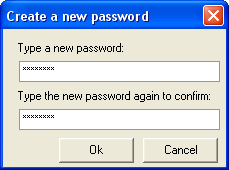
In the dialogue that comes up, enter your password twice.
Notes:
After restart of the program and later on every time on the program's start you'll be asked to enter your password.
To remove the password from a database, call the [Tools | Options] dialog again and uncheck the "Password Protection" option.
Related topics:
- Create a new Database
- Open Database
- Save Database
- Protect information


|
|
|
|
|
|


