Buy
   Home  » VIP Organizer  » Online Manual
Tasks List Options
Live Chat Software for Business
About
System Requirements
User interface summary
Main Toolbar
Navigation Bar
Categories Bar
Filters Bar
Tasks List
Export of Tasks Toolbar
Tray Bar
Columns Layout
Creating a New Task
Deleting existing Task
Editing existing Task
Filter Tasks
Group Tasks
Sorting Tasks
Recurrences Tasks
Reminder
Change of categories
Management a task order
Task Properties
Find Text
Category Summary
Create a Category
Add Sub Category
Editing a Category
Deleting a Category
Management a category order
Sorting Categories
Change Category Hierarchy
Import/Export CSV
Export Tasks List
Create a new Database
Open Database
Save Database
Protection information
General Options
Appearance
»Tasks List Options
SMTP Options
Upgrades
Technical Support
Purchase
License Agreement
Contact Information

  LOGIN

<< username >>
<< password >>
Remember me on this computer
  Forgot your password?
  Register

  TESTIMONIALS
"...I've tried all three VIP products and am very impressed with their excellent quality and your exceptional support (you responded to my email questions promptly and helpfully). I've decided upon VIP Organizer, which fits my needs exactly and it is far superior to any other product on the market, whether web-based or stand-alone. In my opinion, you have met the challenge of making a perfect organizer..."
Gerald R. Williams -
Provo, UT

Tasks List Options


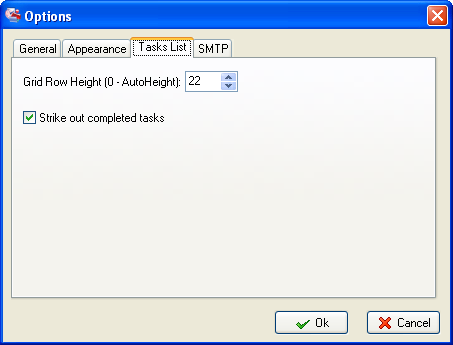
The options dialog is accessed via the [Tools | Options] menu command.
 
The following Task List settings for VIP Organizer may be enabled.
 
Grid Row Height
Setting up the height of lines in the Task List. The option ‘Grid Row Height’ allows you to set the required line height in the tabular representation of the Task List. The Task List automatically selects the required line height if the “0” value was entered.The “0” value is set by default.

Strike Out Completed Tasks
When displaying a completed task in the Task List, the name of this task and other information related to this task are displayed in strikeout.

  Related topics:

  1. General Options
  2. Appearance
  3. Tasks List Options
  4. SMTP Options

  Products Solutions Download Buy Support Contact My Account 

  Copyright © 2004 - 2008 VIP Quality Software, Ltd. All Rights Reserved.

 
Legal Information
Task Management Software
Task Management Guide