Buy
   Home  » VIP Simple To Do List  » Online Manual
Tray Bar
Live Chat Software for Business
About VIP Simple To Do List
System Requirements
User interface summary
Main Toolbar
Navigation Bar
Categories Bar
Filters Bar
Tasks List
»Tray Bar
Columns Layout
Creating a new Task
Deleting existing Task
Editing existing Task
Filter tasks
Group Tasks
Sorting Tasks
Recurrences Tasks
Reminder
Change of categories
Management a task order
Task Properties
Find Text
Category Summary
Create a Category
Editing a Category
Deleting a Category
Management a category order
Sorting Categories
Password Protection your Information
General Options
Appearance
Tasks List Options
SMTP Options
Upgrade information
Technical Support
Registering VIP Simple To Do List
License Agreement
Contact Information

  LOGIN

<< username >>
<< password >>
Remember me on this computer
  Forgot your password?
  Register

  TESTIMONIALS
"...This is an excellent program. I'm so glad that I stumbled on to this when researching for task management programs. Very low learning curv, quite flexible, and the price is right. Tried at least 20 other programs, either too complicated, too expensive, or poor documentation..."
Chad Lindsey -
Honolulu, HI

Tray Bar


 You can open the Tray Bar by left click on the icon of the program in the system tray. It contains some useful menu items.
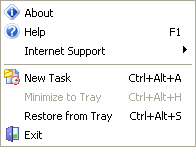
About

This menu item contains information about the program version.

Help

Opens the program's help file.

Internet Support

This item helps you to get to the program's home page or to register the program.

New Task

This command creates a new task. You can also create a new task with the help of Ctrl+Alt+A buttons.

Minimize to Tray

This command minimizes the program window to the system tray if the program window is open. Also you can use Ctrl+Alt+H buttons.

Restore from Tray

This command restores the program window from the system tray if the program window is minimized. Also you can use Ctrl+Alt+S buttons.

Exit

This item closes the program.

Related Topics:


  Products Solutions Download Buy Support Contact My Account 

  Copyright © 2004 - 2008 VIP Quality Software, Ltd. All Rights Reserved.

 
Legal Information
Task Management Software
Task Management Guide