| Order 750 checklists in MS Word and PDF printable format at $49.99 USD only. |
BUY NOW!  |
|
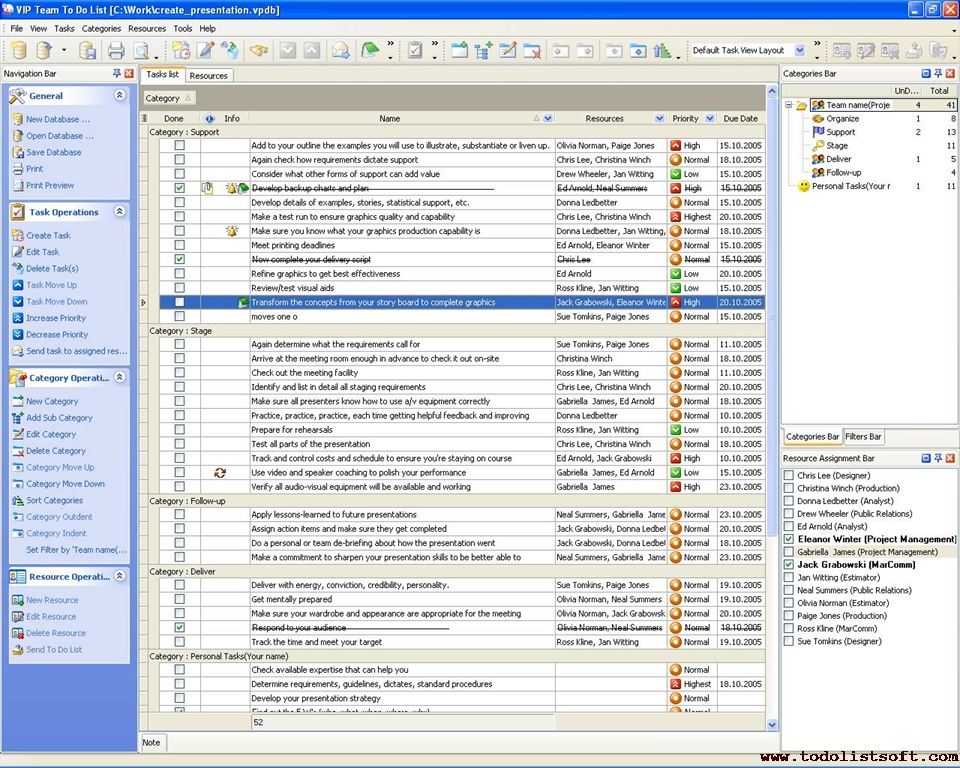
Task Name |
Team Memebers |
Category : Support |
- Add to your outline the examples you will use to illustrate, substantiate or liven up.
|
Olivia Norman, Paige Jones |
- Again check how requirements dictate support
|
Chris Lee, Christina Winch |
- Consider what other forms of support can add value
|
Drew Wheeler, Jan Witting |
- Develop backup charts and plan
|
Ed Arnold, Neal Summers |
- Develop details of examples, stories, statistical support, etc.
|
Donna Ledbetter |
- Make a test run to ensure graphics quality and capability
|
Chris Lee, Christina Winch |
- Make sure you know what your graphics production capability is
|
Donna Ledbetter, Jan Witting, Eleanor Winter |
|
Ed Arnold, Eleanor Winter |
- Now complete your delivery script
|
Chris Lee |
- Refine graphics to get best effectiveness
|
Ed Arnold |
|
Ross Kline, Jan Witting |
- Transform the concepts from your story board to complete graphics
|
Jack Grabowski, Eleanor Winter |
Category : Stage |
- Again determine what the requirements call for
|
Sue Tomkins, Paige Jones |
- Arrive at the meeting room enough in advance to check it out on-site
|
Christina Winch |
- Check out the meeting facility
|
Ross Kline, Jan Witting |
- Identify and list in detail all staging requirements
|
Chris Lee, Christina Winch |
- Make sure all presenters know how to use a/v equipment correctly
|
Gabriella James, Ed Arnold |
- Practice, practice, practice, each time getting helpful feedback and improving
|
Donna Ledbetter |
|
Ross Kline, Jan Witting |
- Test all parts of the presentation
|
Chris Lee, Christina Winch |
- Track and control costs and schedule to ensure you're staying on course
|
Ed Arnold, Jack Grabowski |
- Use video and speaker coaching to polish your performance
|
Gabriella James, Ed Arnold |
- Verify all audio-visual equipment will be available and working
|
Gabriella James |
Category : Follow-up |
- Apply lessons-learned to future presentations
|
Neal Summers, Gabriella James |
- Assign action items and make sure they get completed
|
Jack Grabowski, Donna Ledbetter |
- Do a personal or team de-briefing about how the presentation went
|
Jack Grabowski, Donna Ledbetter |
- Make a commitment to sharpen your presentation skills to be better able to advance cause and career
|
Neal Summers, Gabriella James |
Category : Follow-up |
- Deliver with energy, conviction, credibility, personality.
|
Sue Tomkins, Paige Jones |
|
Olivia Norman, Neal Summers |
- Make sure your wardrobe and appearance are appropriate for the meeting
|
Olivia Norman, Jack Grabowski, Donna Ledbetter |
|
Olivia Norman, Neal Summers |
- Track the time and meet your target
|
Ross Kline, Jan Witting |
| |
- Check available expertise that can help you
|
|
- Determine requirements, guidelines, dictates, standard procedures
|
|
- Develop your presentation strategy
|
|
- Find out the 5 W's (who, what, when, where, why)
|
|
- Get colleague or management review before proceeding
|
|
- Identify and assess audience
|
|
- Identify resources needed for each task and determine availability
|
|
- List factors associated with meeting conditions that might influence presentation
|
|
|
|
- Write out the specific objective - the end product
|
|
- Write out your general objective ...
| Order 750 checklists in MS Word and PDF printable format at $49.99 USD only. |
BUY NOW! |
|
|




 Play Demo >>




 FREE Download CentriQS