Buy
Support
   Home  » Support  » Frequently Asked Questions (FAQ)  » How to export to Excel only tasks of a certain folder (category)
Live Chat Software for Business
Support
News Archive
Register
Affiliate Program
Reseller Program
FAQ
Forum
Helpdesk
Company
Contact Us
Search

  LOGIN

<< username >>
<< password >>
Remember me on this computer
  Forgot your password?
  Register

How to export to Excel only tasks of a certain folder (category)


I would like to export to Excel only tasks of a certain folder (category)

You can export tasks to Excel only in VIP Organizer and VIP Team To Do List software.

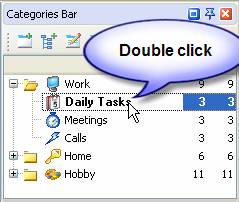
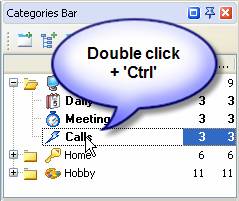
You need to set filter by required Category, so only tasks of this category were displayed.

  1. In the Categories Bar double click on category to set filter
  2. To Set filter for several Categories use CTRL
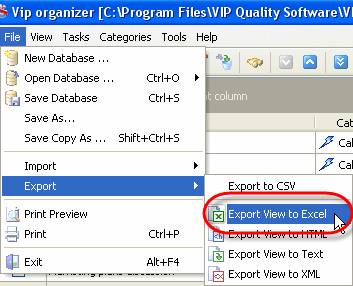
  3. Go to menu [File -> Export -> Export view to Excel]


  Products Solutions Download Buy *Support* Contact My Account 

  Copyright © 2004 - 2008 VIP Quality Software, Ltd. All Rights Reserved.

 
Legal Information
Task Management Software
Task Management Guide