"...This is an excellent program. I'm so glad that I stumbled on to this when researching for task management programs. Very low learning curv, quite flexible, and the price is right. Tried at least 20 other programs, either too complicated, too expensive, or poor documentation..."
You’ll have a safer, less expensive and more enjoyable trip if you plan it beforehand. Even going on a small trip you should make some preparation not to forget anything at home, be on your travel schedule, keep your property safe while you’re traveling, etc. You can not remember all the little details when you’re rushing to get away and as a result you can not relax and enjoy your travels. Here are some tips for you to organize best travels and vacations in your life by using VIP Organizer:
Step 1. Plan
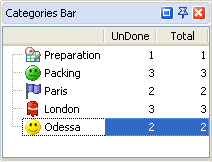
Your plan should contain the categories your travel can be divided into, such as '6 months before', '1 month before', '1 week before', etc. or such stages as 'Preparation', 'Packing', etc. or places you plan to visit, ex.: 'Paris', 'London', 'Odessa', etc. You can use ready-made checklist that lists general things each travel plan consists of.
Categories or Right mouse-click on Category Bar -> New Category
Step 2. Make to do list
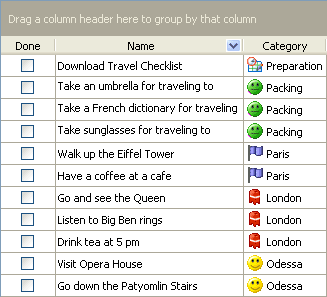
Make a list of things you would like to do or have to do for each travel plan category. If the category is a city or country you are going to, then you can list things you want to do there or places you want to visit, ex.: 'Order a frog in one of the restaurants in Paris'. If the category is like 'packing' you can list things you would like to take with you, ex.: 'Take a life jacket to have one in gondola while being in Venice '. Write down as many ideas as possible. Don’t analyze and criticize when brainstorming, you can do it later.
Tasks -> Create Task or Create Task button or Insert button
Step 3. Schedule
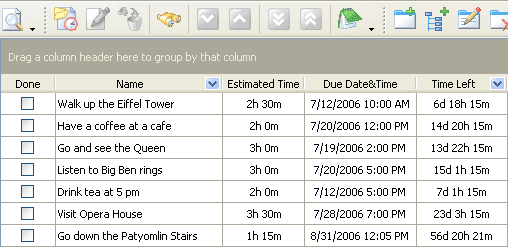
Appoint time for the things you planned to do during your travel. Estimate time for each activity to plan a realistic tour timetable for a day. Then you can easily sort and filter your to-do's to see what you should do today, tomorrow, this week, etc. Also you can set a reminder and if you travel with your laptop. If you can't wait the travel day or vacation period to come, look at Time Left column from time to time J
Edit Task -> Due Date -> Calendar
Step 4. Set priority
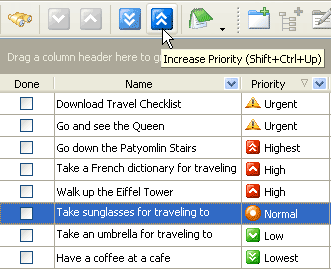
If you planned too much or need to decide what things to do first, setting priorities can help you a lot. Some activities like 'Take the tickets to the airplane' are essential for your travel, others like 'Take an umbrella to London ' are not so important or critical. Even if you won't be able to do the whole list, you will spend time not on trifles but the main things your travel is meant for.
Select a task -> Increase/Decrease Priority buttons
Looking for multi-user task management software? Try CentriQS complete task management solution for planning, tracking and reporting tasks, projects, and schedules. Increase productivity of your small business or office by better organizing your employees' tasks and time.



 Play Demo >>




 FREE Download CentriQS